Getting Started
This page takes you from an empty directory to a window with a working counter, then shows how to render the same screen without a window.
Requirements
Section titled “Requirements”- Go 1.27 or newer.
- To open a window: a Wayland or X11 session on Linux, or Windows. macOS builds, but has no window backend yet.
- Nothing else. There is no C toolchain, no GTK, no browser: build with
CGO_ENABLED=0and ship one static binary.
Create the module
Section titled “Create the module”The tela command can do this and the next step for you: tela new counter
(see CLI). By hand:
mkdir counter && cd countergo mod init example.com/countergo get github.com/kuronosu/tela@latestWrite the app
Section titled “Write the app”A Tela program is a tree of nodes built by components: functions, like the one
below, and structs with a Build method (next section). The elements
(Div, Button, Text…) live in package h, which is meant to be
dot-imported so markup reads like JSX; hooks, events and Run live in package
tela.
package main
import (  "github.com/kuronosu/tela"  . "github.com/kuronosu/tela/h")
// Counter shows a count and a button that adds one. It is the public name:// tela.C gives the function below a component boundary of its own, so// whoever uses Counter() never writes tela.C.func Counter() tela.Node { return tela.C(counter) }
func counter() tela.Node {  count, setCount := tela.UseState(0)
  return Div(Class("flex flex-col items-center gap-6 p-10 rounded-3xl "+    "bg-linear-to-br from-indigo-500 to-fuchsia-600 shadow-2xl"),    H1(Class("text-5xl font-bold text-white tracking-tight"),      Textf("Count: %d", count)),    Button(Class("px-6 py-3 rounded-xl bg-white/15 text-white "+      "hover:bg-white/25 active:scale-95"),      OnClick(func(tela.MouseEvent) { setCount.Set(count + 1) }),      Text("Increment"),    ),  )}
// Preview lets `tela snapshot` and `tela inspect` render the screen.func Preview() tela.Node { return Counter() }
func main() {  tela.Main(tela.App{    Title:     "Counter",    Width:     480,    Height:    320,    RootClass: "bg-slate-100",    Root:      Counter(),  })}
The pieces:
tela.UseStatereturns the state and atela.Setter.setCount.Set(v)replaces the state and rebuilds the component in the next frame;setCount.Update(func(n int) int { return n + 1 })computes it from the previous state.Classtakes Tailwind v4 classes. Variants such ashover:andactive:restyle the button under the pointer.OnClickreceives atela.MouseEventby value.tela.Appdescribes the window andtela.Mainopens it and runs the event loop until it is closed. When no display is available it prints the error and exits with status 1 (tela.Runreturns the error instead). Both panic whenRootis nil.Counteris a function component. Its hooks live in the privatecounter, and the publicCounter()returnstela.C(counter): the component boundary is written once, where the component is defined, soPreview,Rootand the tests just callCounter(). Callingcounter()directly would run its hooks inside the caller, and dev mode stops you with the fix. A struct component needs no wrapper.
Components with props
Section titled “Components with props”A component that takes props is a struct with a Build method. Its fields
are the props, its children are a field of type tela.Component, and every
value you put in a tree is a component of its own, with its own state:
// Stat is a labeled number with a "details" toggle.type Stat struct {  Label    string  Value    int  Children tela.Component // shown when open; several nodes via Fragment}
func (s Stat) Build() tela.Node {  open, setOpen := tela.UseState(false)  return Div(Class("rounded-xl bg-white p-4 shadow"),    P(Class("text-sm text-slate-500"), Text(s.Label)),    P(Class("text-3xl font-semibold"), Textf("%d", s.Value)),    Button(OnClick(func(tela.MouseEvent) { setOpen.Set(!open) }), Text("Details")),    If(open, s.Children))}
func Dashboard() tela.Node {  return Div(Class("grid grid-cols-2 gap-4 p-6"),    Stat{Label: "Visitors", Value: 1284, Children: Text("+12% this week")},    Stat{Label: "Signups", Value: 87})}
Build has a value receiver. When Dashboard builds again and a Stat’s
fields are equal to the previous ones, that Stat is not built again. See
Hooks for keys, skipping and function components.
Run it
Section titled “Run it”CGO_ENABLED=0 go run .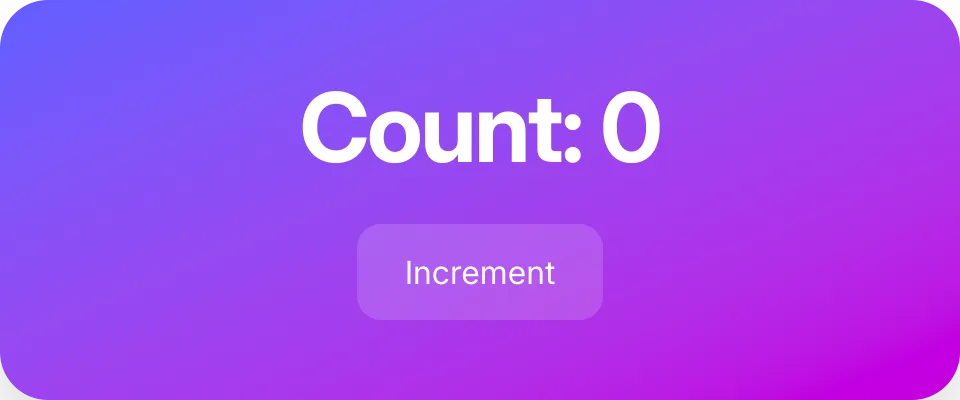
Render it without a window
Section titled “Render it without a window”Because the whole pipeline is headless, Tela can draw a screen to a PNG and
print what it contains as text. That is the loop an agent (or you, in a
terminal) uses to check a UI: write, snapshot, look, inspect, fix. The
tela command is in the module; install it once and use it from any
project:
CGO_ENABLED=0 go install github.com/kuronosu/tela/cmd/tela@latest
tela snapshot --size 480x320 -o counter.png .tela inspect --size 480x320 .(go run github.com/kuronosu/tela/cmd/tela snapshot ... does the same without
installing anything.) While you edit, tela dev . keeps the window open and
reloads it on every save, with its state.
- 'heading "Count: 0" [level=1]'- button "Increment"The commands render the package’s Preview function (or a tela.Previews
variable with several named screens, each started in the state you give it),
in the window of its package-level var App when it has one. See CLI.
Test it
Section titled “Test it”telatest.Mount runs the same tree in a headless window and drives it with real
pointer and key events:
package main
import (  "testing"
  "github.com/kuronosu/tela/telatest")
func TestIncrement(t *testing.T) {  app := telatest.Mount(t, Counter(), telatest.Size(480, 320))
  app.Click(telatest.ByRole("button", "Increment"))
  app.ExpectText("Count: 1")}
See Testing for locators, expectations, goldens and the manual clock.
Dev mode
Section titled “Dev mode”While you develop, Tela reports the mistakes that compile, with the fix. Dev
mode is on in every development build (go run ., go build in a source
checkout) and in every telatest test, and off in release builds (built with
-trimpath, or installed with go install pkg@version).
App.Dev overrides that, and TELA_DEV=1 or TELA_DEV=0 overrides both.
- An unknown class is printed with the closest one (
unknown class "rounded-xxl"; did you mean "rounded-2xl"?); in a test it fails the test. - An unknown role, input type or easing, a change in the order of hooks, a
hook called outside its component (
counter()whereCounter()belongs,Stat{}.Build()whereStat{}belongs), a pointer given as a component (&Stat{}), a prop in a field of typetela.Componentand a nil dependency list (UseEffect(f, nil): usetela.OnceorUseMount) panic with the fix. - Likely mistakes are warnings, printed once per call site (test log lines in
telatest): a list without keys, props that atela.CPcomponent cannot compare, aValue.Getthat misses queued changes (useLatest), a context without a Provider whose default would panic, aLabelthat labels nothing.
telatest.NoDev() tests what a release build does.
Ship it
Section titled “Ship it”A release build is a plain go build. Build with -trimpath: Tela then
treats the binary as a release build and turns dev mode off (see above).
CGO_ENABLED=0 go build -trimpath -o counter .CGO_ENABLED=0 GOOS=windows go build -trimpath -ldflags="-H=windowsgui" -o counter.exe .On Windows, add -ldflags="-H=windowsgui". Go builds console programs
by default, and Windows opens a console window next to the app when a
console program is started from Explorer, a shortcut or the Start menu.
-H=windowsgui makes the executable a GUI program: only the app’s window
opens. Such a program has no standard output or error, so whatever it prints
(dev warnings, a panic’s message) goes nowhere; build without the flag, or
run the app from a terminal, while you debug. go run and tela dev need
nothing: they use the terminal you start them from.
Tela does not hide the console at run time: the window would still flash on
screen, which looks like malware. A future tela build sets the flag for
Windows targets and writes panics to a log file (ADR-127).
Next steps
Section titled “Next steps”- Styling to make it look good.
- Hooks for state, effects and context.
- Events and Forms and Text Input for interaction.
- The
examples/directory has complete screens (dashboard, signup form, kanban board, music player), each with its tests.