Forms and Text Input
Input and Textarea are editable text fields with the behavior of a
browser’s: typing, arrows and Ctrl+arrows, Home and End, Backspace and Delete,
Ctrl+A, undo and redo (Ctrl+Z, Ctrl+Y), the clipboard, mouse selection (click,
drag, double and triple click) and input methods (IME) for Japanese, Chinese
and Korean. Form groups fields and submits on Enter, and Label names a
field and focuses it when clicked.
Fields have Tailwind’s Preflight defaults: no border, padding or background (style them with classes), the inherited font, and a width of about 20 characters unless a class sets one. They take no children.
Controlled fields
Section titled “Controlled fields”A controlled field shows a value from your state, as in React. Bind is the
shortcut for the usual pair, Value(text) plus an OnChange that calls the
setter:
func Signup() tela.Node {  email, setEmail := tela.UseState("")  submitted, setSubmitted := tela.UseState("")
  return Form(Class("flex flex-col gap-2"),    OnSubmit(func(tela.SubmitEvent) { setSubmitted.Set(email) }),    Label(For("email"), Class("text-sm font-medium"), Text("Email")),    Input(ID("email"), Type("email"), Placeholder("you@example.com"),      Bind(email, setEmail),      Class("rounded-md border border-slate-300 px-3 py-2 "+        "placeholder:text-slate-400 invalid:border-red-500")),    Button(Class("rounded-md bg-indigo-600 px-4 py-2 text-white"), Text("Sign up")),    If(submitted != "", P(Textf("Welcome, %s", submitted))),  )}
Written out, the same field is
Input(Value(email), OnChange(func(e tela.ChangeEvent) { setEmail.Set(e.Value) })).
Bind also takes a func(string) in place of the setter, so a reducer’s
Dispatcher can bind: Bind(form.Email, func(s string) { d.Dispatch(setEmail(s)) }).
After every event the field shows Value again unless your handler changed it,
which is also how you restrict input.
Uncontrolled fields
Section titled “Uncontrolled fields”DefaultValue gives the field an initial value and then leaves it alone.
Read it when you need it with ElementRef.Value:
func Quick() tela.Node {  input := tela.UseElementRef()  return Div(    Input(Ref(input), DefaultValue("hello"), AriaLabel("Message")),    Button(OnClick(func(tela.MouseEvent) { send(input.Value()) }), Text("Send")),  )}
func send(string) {}
Binding to a Value
Section titled “Binding to a Value”BindValue binds a field to a *tela.Value[string] from
tela.UseValue: typing writes the value without rebuilding the component
that owns it (only what reads the value rebuilds or repaints), and the field
follows v.Set from anywhere.
func Filter() tela.Node { query := tela.UseValue("") return Div( Input(Type("search"), BindValue(query), AriaLabel("Filter")), Span(TextFn(func() string { return "Searching for " + query.Get() })), )}Field props
Section titled “Field props”| Prop | Does |
|---|---|
Type |
"text" (default), "password" (dots; cannot be copied), "email", "search", "url", "tel", "number" (hints for input methods; the value stays text). Invalid email and url values match invalid: (not in a ReadOnly or disabled field, which HTML bars from validation). On a Button: "submit" (the default in a form), "button", "reset" |
Rows |
How many lines tall a Textarea is (2 by default) |
Placeholder |
Text shown while the field is empty; style it with placeholder: classes |
ReadOnly |
Focusable, selectable and copyable, but not editable; matches read-only: |
MaxLength |
Limits typed and pasted text to n UTF-16 code units (HTML’s maxlength) |
Name |
Names a field or button in its form |
AutoComplete, SpellCheck |
Accepted for familiarity; Tela has no autofill or spell checker |
A Textarea also wraps its text, scrolls when the text is taller than it, and
Enter inserts a line break; with text-nowrap (or whitespace-pre) its lines
do not wrap and it scrolls horizontally too. With field-sizing-content it
grows with its text between min-h-* and max-h-*:
func Message() tela.Node { text, setText := tela.UseState("") return Textarea(Rows(3), Placeholder("Write a message"), Bind(text, setText), Class("field-sizing-content min-h-20 max-h-48 w-full rounded-md border p-2"))}Forms and labels
Section titled “Forms and labels”Form submits on Enter in one of its single-line fields, or on a click on a
Button inside it (buttons in a form are submit buttons unless Type("button"));
OnSubmit receives a tela.SubmitEvent. Tela does not navigate; PreventDefault
exists for familiarity. A button with Type("reset") restores the
DefaultValue of the uncontrolled fields.
Label gives a field its accessible name and focuses it when clicked. It
labels the element whose ID is its For, or else the field inside it:
func Labels() tela.Node { return Div( Label(For("name"), Text("Name")), Input(ID("name")), Label(Text("Nickname "), Input()), )}Use tela.UseID to generate the IDs of a reusable field; see
Hooks. A Label that labels nothing (its For names
no mounted Input, Textarea or Button, and none is inside it) names and
focuses nothing, so dev mode warns about it once; for a caption that labels
no field, use Span or P.
Events of a text field
Section titled “Events of a text field”| Handler | Event | When |
|---|---|---|
OnChange |
tela.ChangeEvent |
After every edit (React’s onChange, per keystroke): Value, InputType, Data, IsComposing |
OnBeforeInput |
tela.InputEvent |
Before an edit, cancelable with PreventDefault (not during an IME composition) |
OnCompositionStart, OnCompositionUpdate, OnCompositionEnd |
tela.CompositionEvent |
An input method starts, updates and ends composing; Data is the text |
OnSelect |
tela.SelectEvent |
The selection changed: Start, End in UTF-8 byte offsets |
OnSubmit |
tela.SubmitEvent |
The form was submitted |
All of them bubble, so a Form’s OnChange sees the edits of all its fields.
InputType uses the W3C names ("insertText", "insertFromPaste",
"deleteContentBackward", "historyUndo"…). To accept digits only:
func Digits() tela.Node { return Input(AriaLabel("Code"), OnBeforeInput(func(e tela.InputEvent) { if strings.Trim(e.Data, "0123456789") != "" { e.PreventDefault() } }))}Handles: reading and selecting text
Section titled “Handles: reading and selecting text”With Ref and an tela.ElementRef, a field can be read and selected from
code. Offsets are UTF-8 byte offsets of the value:
ElementRef.Valuereturns the value (the DOM’sinput.value).ElementRef.Selectselects all of it.ElementRef.SetSelectionRangeselects part of it andElementRef.SelectionRangereturns the selection.ElementRef.Focusfocuses the field.
func Search() tela.Node { search := tela.UseElementRef() return Div(OnKeyDown(func(e tela.KeyboardEvent) { if e.Key == "/" && !search.Focused() { e.PreventDefault() search.Focus() search.Select() } }), Input(Ref(search), Type("search"), Placeholder("Press / to search"), Class("rounded-md border px-2 py-1")), )}Testing fields
Section titled “Testing fields”App.Fill replaces a field’s value like Playwright’s fill;
App.Type sends one key at a time through the real key path; and
App.ExpectValue waits for a value. See Testing.
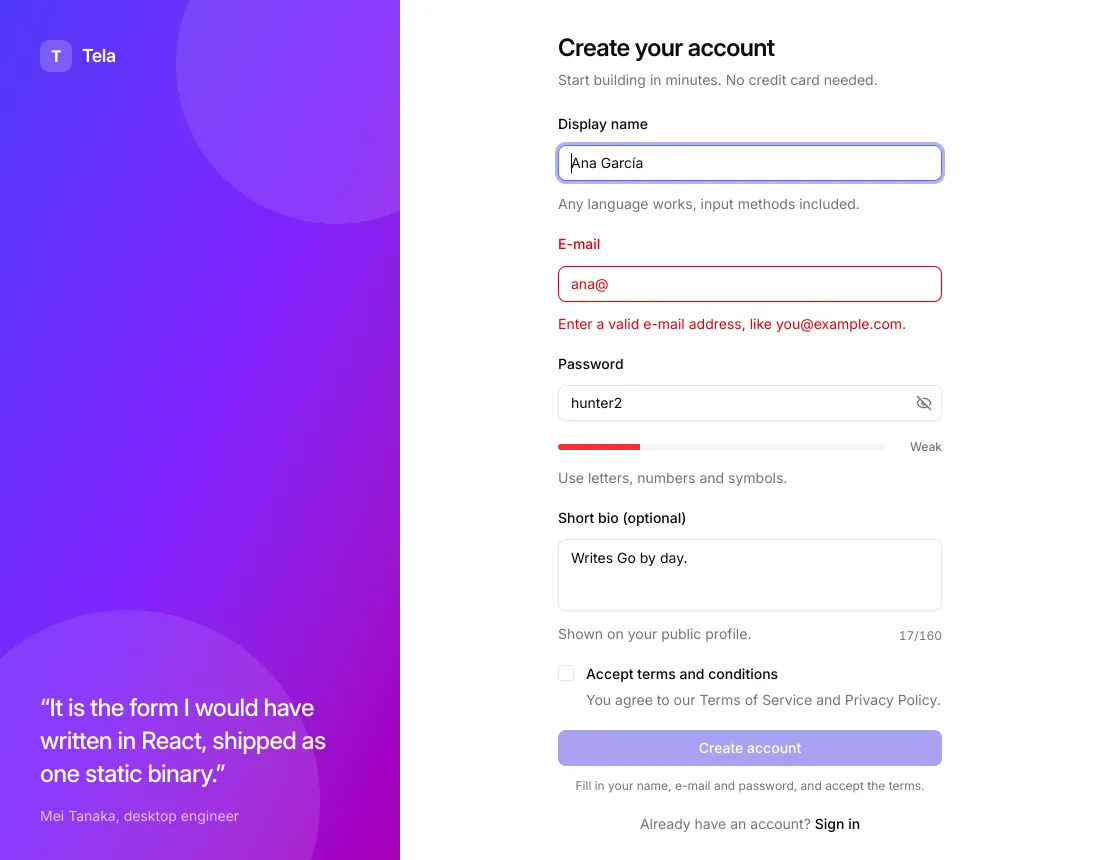
The examples/signup screen puts all of this together: an e-mail with
invalid: and peer-invalid: styling, a password with a show/hide toggle, an
auto-growing textarea with a live counter, and a submit button that stays
disabled until the form is valid.